A.R.G.U.S: Real-Time Phishing & DOM-Injection Interceptor
Phalanx: Real-Time DOM Mutation Monitoring and Threat Mitigation
Modern Web Vulnerabilities & The Client-Side Gap
Modern single-page applications heavily rely on dynamic client-side rendering, leaving them exposed to runtime exploits such as DOM-based Cross-Site Scripting (XSS), malicious overlay redressing, and credential harvesting. Standard network-level firewalls and static server policies cannot detect mutations that occur entirely inside the browser's Document Object Model.
A.R.G.U.S. fills this security void by executing directly within the browser session context. By establishing real-time telemetry over third-party scripts and asynchronous DOM nodes, it guarantees that compromised dependencies or Man-in-the-Middle (MitM) payload injections are blocked before browser rendering completes.

How an Injection Is Stopped
The path of a malicious DOM change from insertion to telemetry.
1. Inject
A compromised script or MitM payload inserts a node.
2. Observe
MutationObserver loops see the insertion at the browser API layer.
3. Analyse
Heuristics match the payload against known signatures.
4. Purge
The element is removed before rendering completes.
5. Record
The incident appears in the visual telemetry dashboard.
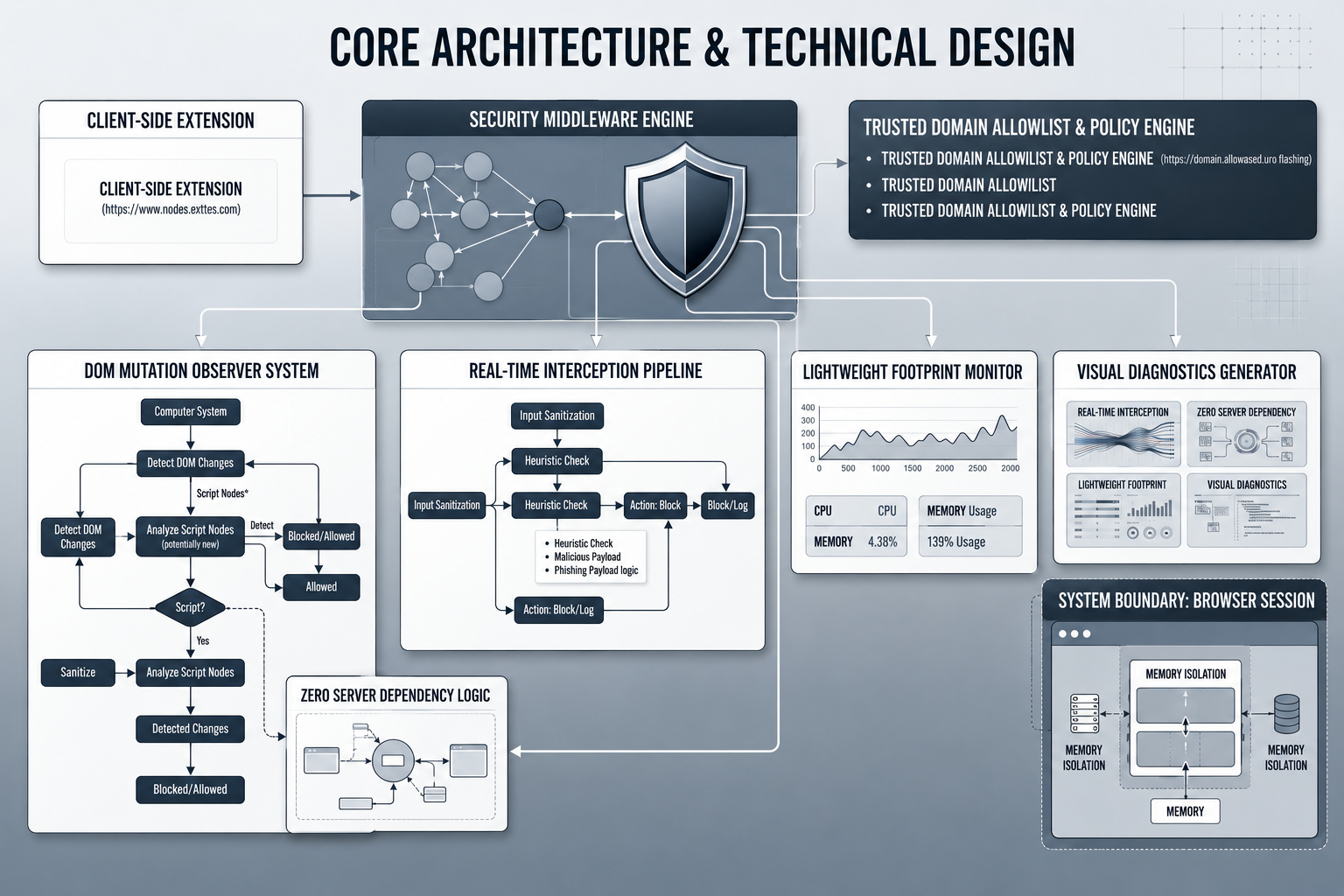
Core Architecture & Technical Design
The Phalanx engine operates as an isolated security middleware injected into the browser runtime. It utilizes continuous MutationObserver event loops to track element creation, attribute alterations, and inline script attachments across all DOM nodes.
- Mutation Monitoring: Intercepts dynamic element insertions directly at the browser API layer.
- Heuristic Sanitization: Analyzes raw payloads against string signatures to prevent overlay phishing.
- Memory Isolation: Keeps telemetry logs and policy engines isolated inside dedicated extension threads.
Key Defensive Features
Real-Time Interception
Neutralizes DOM-based injection payloads at the microsecond of insertion, preventing phishing overlays from rendering.
Zero Server Dependency
Runs entirely client-side as a browser extension, remaining agnostic to backend server frameworks.
Lightweight Footprint
Asynchronous observation hooks guarantee rendering speeds and frame rates remain uninterrupted.
Visual Diagnostics
Built-in interactive D3.js dashboards provide instant visual graph telemetry on blocked vectors.

Installation & Demonstration Guide
1. Clone the Repository
git clone https://github.com/siddarthgulimi/A.R.G.U.S.git2. Load the Extension
- Open your Chromium browser and navigate to
chrome://extensions/. - Enable Developer mode using the toggle switch in the top-right corner.
- Click Load unpacked in the top-left corner and select your project directory.
- Pin the Phalanx extension to your browser toolbar for quick telemetry access.
3. Configure the Interception Proxy
- Configure Proxy: Route browser traffic through Burp Suite to capture live responses from test targets.
- Stage Injection Payload: Intercept a target response (
200 OK) and introduce a test form or script tag directly beneath the document's<body>tag.
4. Observe the Defense
Forward the response. Phalanx immediately detects the unauthorized node addition via its mutation observer, purges the element from the DOM tree, and records the incident in the visualization telemetry.
Try It Yourself
Run the project live in your browser, or install the open-source build on your own machine.
Run it in your browser
A.R.G.U.S runs inside a browser extension, so it cannot be hosted as a web page. Its successor runs live here:
RUN DEMO: PHALANX 2.0Install it on your machine
A.R.G.U.S is a browser extension; load it unpacked in Chrome or Edge from the repository to see the DOM interceptor working on real pages.
INSTALL THE PROJECT (OPEN SOURCE) Source code on GitHubExplore the Source Code
The original A.R.G.U.S interceptor, and its successor Phalanx 2.0 with a native desktop app, download inspection and site scoring.
Visit A.R.G.U.S Repository See Phalanx 2.0